



Every time something breaks in our data platform, somebody posts an announcement in the 6 Slack channel. Every single time, we get the same questions:
“Is the Bookings dashboard affected?“
“What about the ML report?“
“Are the numbers in the product usage report going to be wrong?“
Three to five variations of the same question, from different people, about different things, all asking me to do the work they should do themselves.
Not that the announcements are unclear about what’s wrong, but we can’t list everything that’s fine. So they do the only thing available to them and asked.
And that’s only a part of the story. When a failure happens at the ingestion layer, we do not always know immediately what downstream data it affects. The lineage from a broken pipeline to a broken dashboard is not always obvious without the right tooling.
I decided to fix both at once. What I built is a data platform status page. The result was zero questions per incident. It has been that way since we launched it.
Here’s how you can do the same.
Data Teams Love the Word “Product” But Rarely Treat Their Platforms Like One
The data community has spent years arguing that data should be treated as a product. We now have data product managers, data product roadmaps, data product thinking and what not.
The common understanding is that data teams should operate with the same rigor, user focus, and accountability as software product teams.
And then those same teams don’t even post a Slack message when something breaks.
Every SaaS product you use has a status page. When something goes wrong with Stripe or GitHub or Claude (yesterday anybody?), there is a single place you go to see what is affected, what the team is doing about it, and how long the incident has been running.
You do not send a message to the Dear Self support team (that’s just me) asking if your journal processing is working. You go to status.dearself.ai.
Data teams do not do this.
They:
sometimes announce incidents in Slack
generate a thread of panicked questions
answer those questions individually
and repeat the process next time.
The data as a product positioning is real in the planning meetings, but always disappears the moment something breaks.
The gap is in mindset, and the tooling to close it has been available for years.
Status pages are a basic operational practice that product teams figured out long ago, and somehow you don’t have them for your data “products”.
What You Need to Build This
If you’re running a modern data stack, you likely have most of the pieces already. Here’s what our setup looks like:
An ELT process that lands raw data in the warehouse with a schema that mirrors the source. Everything in the lineage graph starts here.
Two dbt repositories. One handles data engineering transformations. The other handles business-level transformations. This is has nothing to to d
A data observability tool with column-level lineage. We use SYNQ. Without column-level lineage, the question “what downstream assets does this failure affect?” has no reliable answer.
A BI tool. We use Omni. The specific tool matters less than whether it exposes an API.
And a few notes on that.
First, the process obviously works with ETL, but it’s slightly easier with ELT. We switched to ELT long ago, and our reasons may not be true for you. Don’t change your process if it works well.
Second, you absolutely don’t need 2 dbt projects. I decided to keep them separate, so I don’t mix skills, standards and workflows for our 2 subteams, DataOps and BI.
Last, but not least, you don’t need SYNQ specifically. Any observability or cataloging tool with column-level lineage works:
Elementary is a solid open-source option.
OpenLineage works if you’re building from scratch.
The principle is the same: you need a system that knows how data moves from source to consumption layer and exposes that through an API.
The Mapping Problem (And How AI Solved the Boring Part)
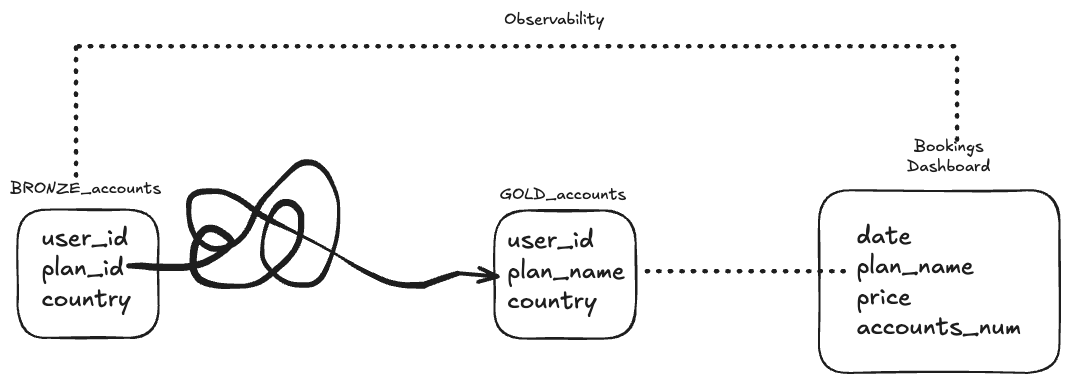
And here’s what makes this harder than it looks. SQNQ knows plan_id in the accounts table flows through some transformation int the bookings model. But it doesn’t know is which dashboard tile queries bookings.
Without that mapping, the status page tells stakeholders a dbt model failed and nothing about whether their report is affected.
SYNQ doesn’t support Omni out of the box. So we built the bridge. I wrote a script that:
pulls a selected set of official dashboards from Omni’s API
extracts every tile in those dashboards
retrieves the query each tile executes
That gives us a map between Omni tiles and the underlying dbt models. Combined with SYNQ’s lineage graph, we trace a failure at the ingestion layer all the way through to specific dashboard tiles and surface exactly which reports are affected.
How an Incident Works
When a test fails or a pipeline breaks, we get a notification. So we run a quick triage: is this a real incident affecting stakeholders, or a transient failure we resolve quickly and silently? If it’s real, we go to SYNQ and declare an incident.
That declaration triggers a Slack notification to the channel. The notification includes a link to the status page, where stakeholders see exactly which data products and reports are affected. They don’t need to ask. The answer is already there.
As we work through the incident, we add comments and updates directly in SYNQ. Each comment triggers another Slack notification. Stakeholders get a running update without anyone on the team writing a separate message or copying the same information across threads.
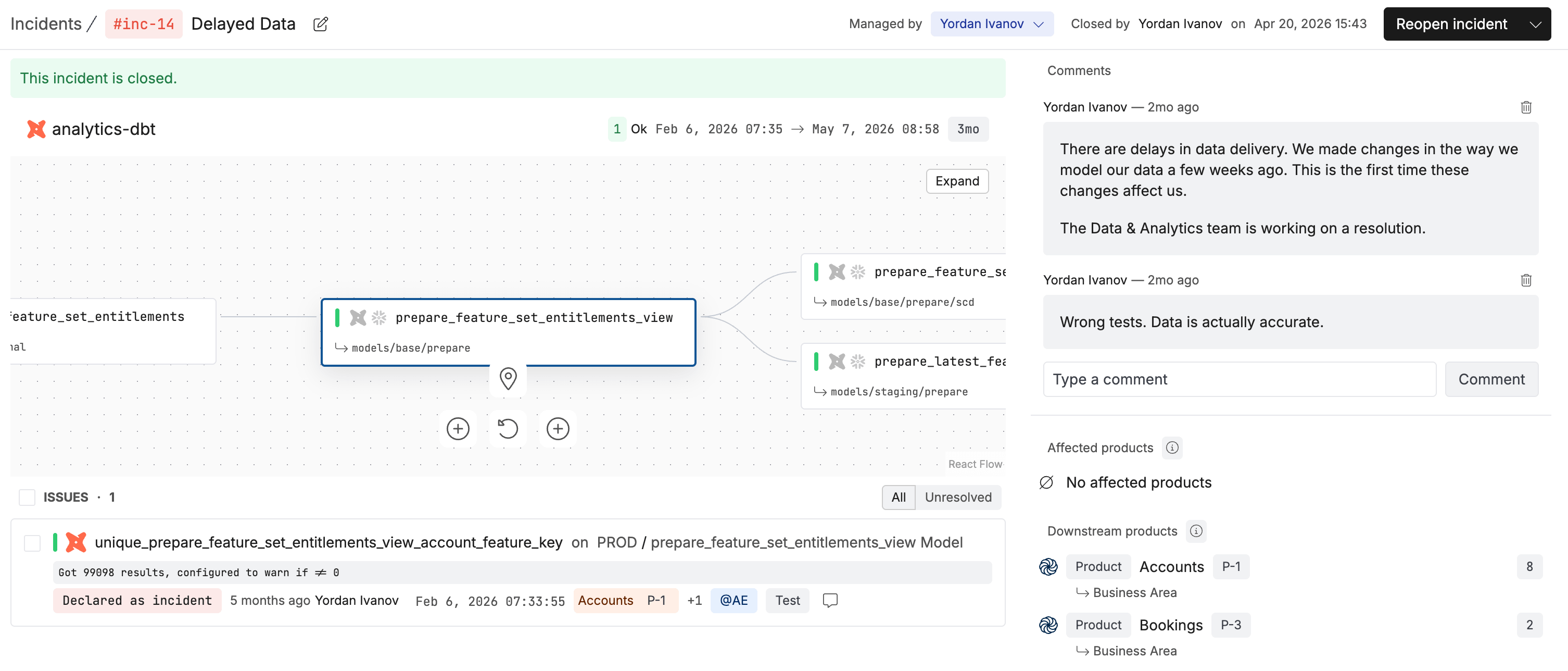
Stakeholders follow the link, see the state of their data, and go back to their work.
What the Status Page Shows
The page is structured around data products, instead of incidents. The whole point is to give them access to something user-friendly that’s structured around how they think about data.
Here’s what they see:
Selected data products. These are groups of dashboards. They have no idea about tables or pipelines.
Reports per product. A list of reports associated with each data product.
Current status, which we pull in real time from SYNQ.
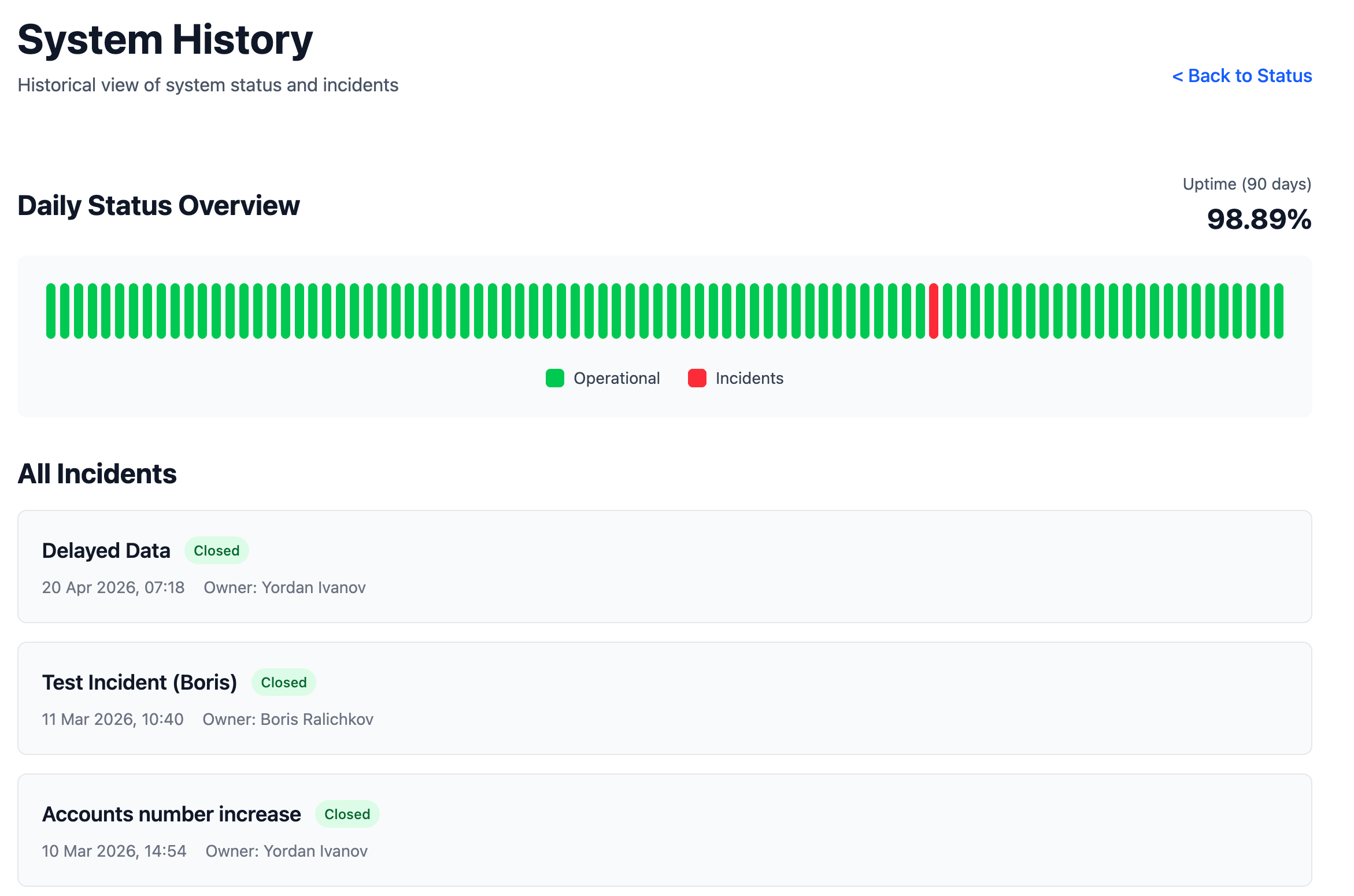
Status history showing the track record over time.
Individual incident detail pages, including affected reports and a full timeline of updates.
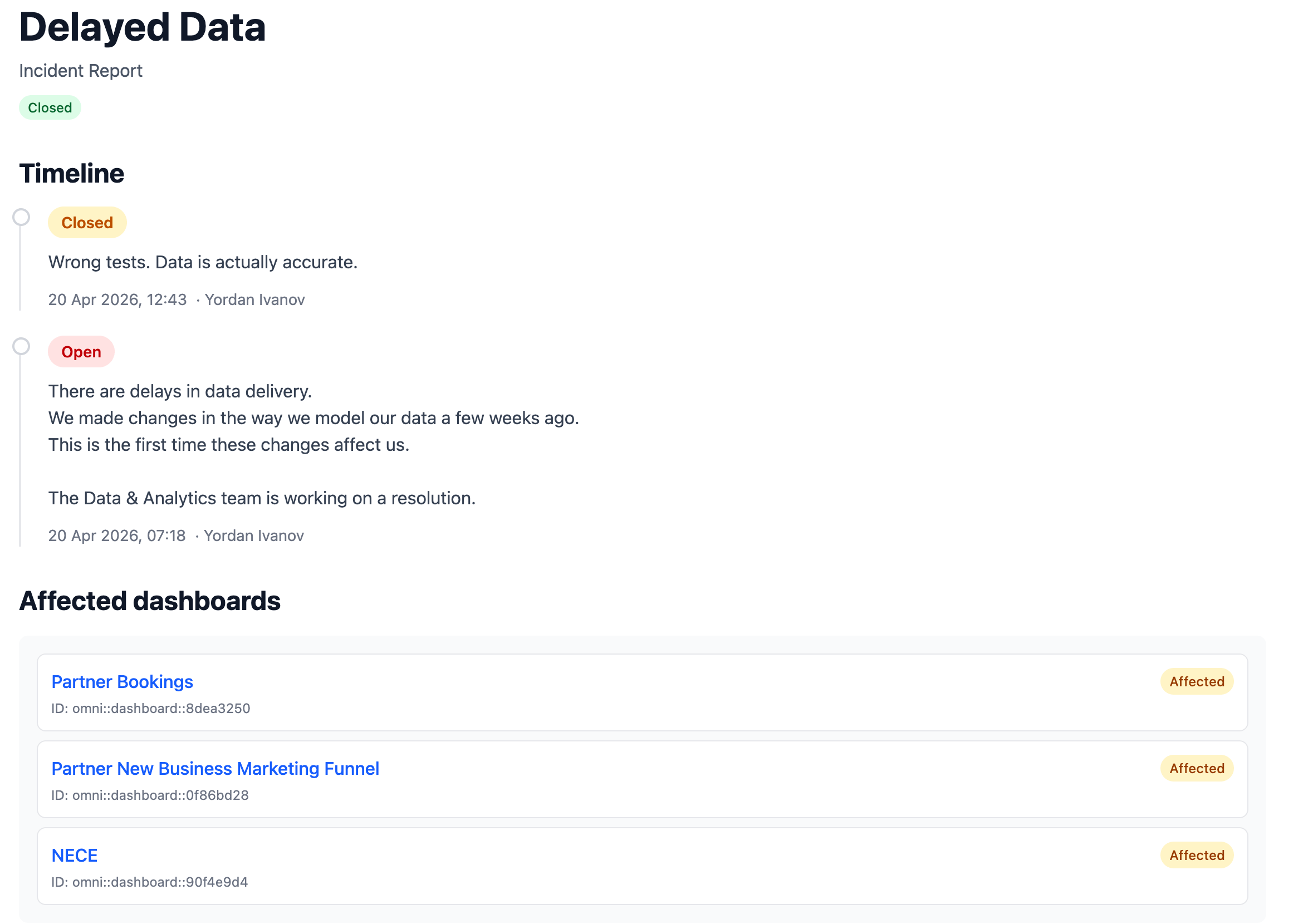
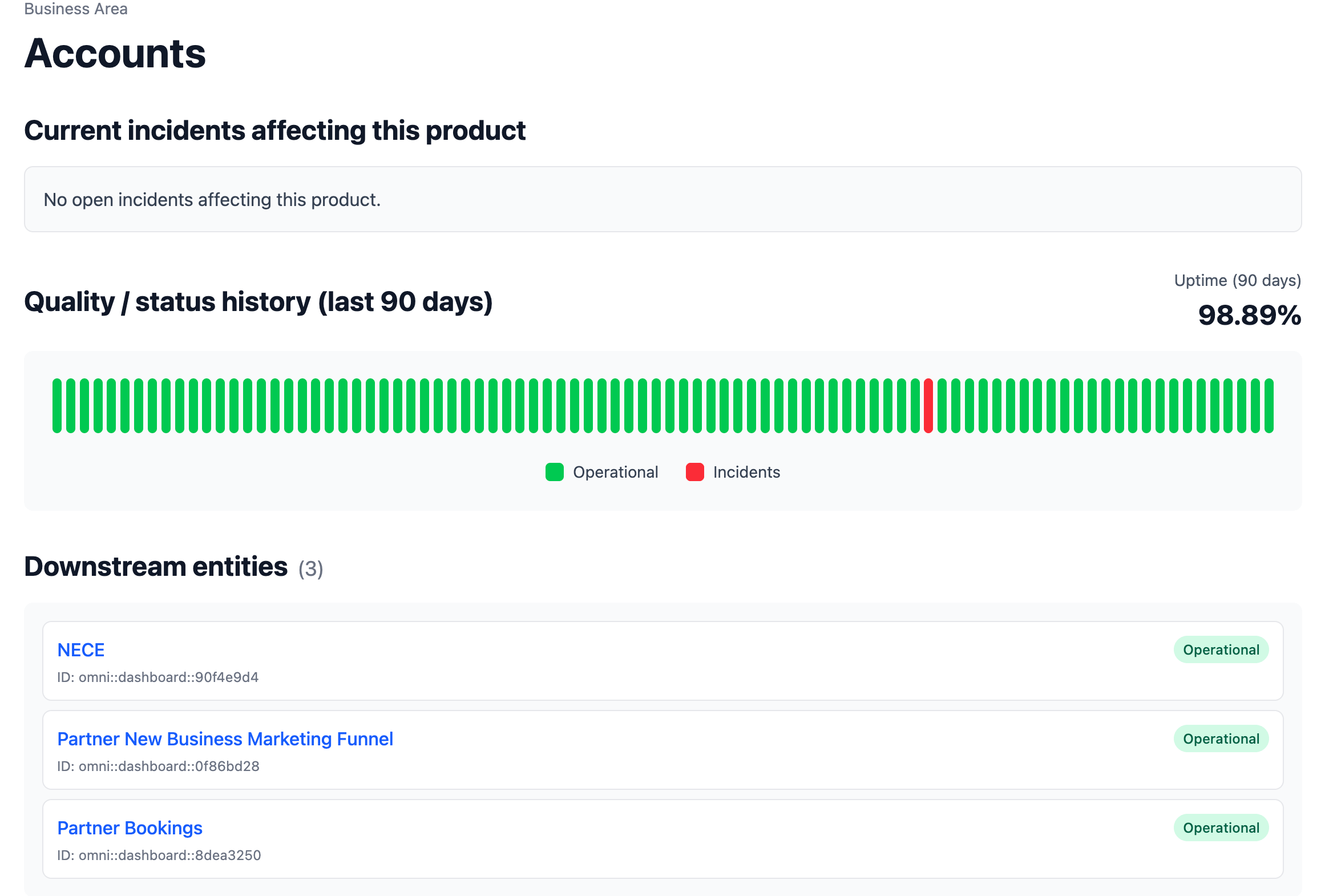
Scoping the page to the products stakeholders care about is what makes it useful. Everything else would be noise.
The page has no database. It makes API calls to SYNQ at request time and renders the current state. Less infrastructure to maintain, and nothing to keep in sync.
Why Showing Failures Builds More Trust Than Hiding Them
The instinct when something breaks is to fix it quietly and move on. You might post a minimal announcement, keep the details sparse, resolve it fast, and say as little as possible.
I know that every incident announcement feels like an admission, and the more you say, the worse it looks.
That instinct is backwards.
Stakeholders lose trust when the team goes quiet during an incident and offers nothing useful until it’s resolved. The team that declares incidents publicly, posts running updates, maintains a visible history, and posts postmortem reports earns a different kind of reputation.

When a random manager raises data reliability as a concern, most data leads respond defensively. They explain the complexity, list the improvements they’re making, and leave the room without having changed anyone’s mind.
With a status page and twelve months of history, the conversation is very different. You pull it up, and show incident count, average resolution time, and trend. The conversation moves from subjective complaint to documented fact, and the documented fact works in your favor.
The status history is the part people underestimate. When you have a year of publicly visible incidents with response times and resolution notes, nobody tells you the data is always broken.
There’s also a simpler mechanism at work. When stakeholders know you’ll tell them when something goes wrong, they stop checking.
They stop asking “is this dashboard up to date?“ as a routine question, because they know that if it weren’t, they’d have heard from you.
That baseline confidence is worth more than any data quality initiative or SLA document you write. A status page operationalizes it so it happens automatically, every time, without anyone on the team having to think about it.
Data teams that earn strategic partnerships with the business are the ones whose stakeholders trust they’ll hear about problems before they have to ask.
This publication is not about tools.
It is about operating as a data professional in a world that has no idea what you do or why it matters.
Final Thoughts
None of that code was written by me. I read the API documentation for both tools, described what I needed, and handed it to an AI coding tool. The status page, the mapping script, the full integration. The whole project was complete in a matter of days.
The truth is that you don’t need to be a strong engineer to build this.
You need to recognize the problem, read some documentation, and spend a couple of days on it.
Every senior data professional has the ability to make this kind of impact. Most haven’t built it because they’ve never thought to look at what software product teams do and ask what they’re missing.
The skill here was identifying the gap.
AI allows you to go give life to your ideas faster than ever.
—
Until next time,
Yordan
Subscribe to Data Gibberish: https://www.datagibberish.com
Connect on LinkedIn: https://www.linkedin.com/in/ivanovyordan
Work with me: https://www.ivanovyordan.com/coaching
Start journaling: https://www.dearself.ai
PS: Paid subscribers get monthly Show & Tell sessions where you bring a real career, leadership or stakeholder problem and we work through it live together. Upgrade here, when you are ready.
PPS: Also, remember to check my Premium Content Library here.
> Two dbt repositories. One handles data engineering transformations. The other handles business-level transformations.
This deserves its own article on the importance of two transformation repos. The separation of concerns keeps the two adaptable to changes without being entangled. I'm currently building a greenfield lakehouse with this pattern.
Building stakeholder trust through the status page is the leverage here and that will continue to compound. Also, scoping the page to the parts the stakeholders are interested in is so important. It wouldn't get looked at otherwise or you'd end up with the same amount of questions/messages.
Question though: how do you handle the triage call? Whether to "fix it quietly" or "declare it publicly." Who owns that?