


This article is part of the Build & Lead Data Teams playlist. Click here to explore the full series.
I’ve been working remotely for nine years now, long before COVID made it mainstream. The last 6 of those years, I’ve led a team.
I’m a massive proponent of remote work, but I know most people never learn how to lead a remote team well. Actually, most managers are quite incompetent at it, and their teams pay for it in lower performance.
So today, I’m going to try to tell you how I run my remote team that ships more work, at a higher quality, than most in-office teams.
Where Most Teams Fail
Communication in the office is easy. You go to a coworker’s desk and ask them to help you, then sit together and work on the problem. You don’t need any real skill to do that.
The same applies to knowledge sharing. Since you are all in the same room, ideally sitting next to each other, knowledge gets shared naturally through diffusion.
Not to mention, how easy it is for a manager to see if their team members struggle with something, and help them on the spot.
None of this is possible in a remote working environment. Most people, never get a proper training in remote working etiquette, and fail miserably. Then they say everyone should just work from the office.
So here’s exactly how I run a remote team that works well.
Daily Stand-Ups
Most people get stand-ups wrong. They think these meetings are just a status report. You do something on the side, or scroll your phone waiting for your turn. Then, you sing your song, and get back to staring into the dark.
“This could have been an email”, everybody says.
But that’s not the point of morning stand-ups. In remote setting, they have 3 functions:
Team bonding
Status update
Knowledge sharing
Team bonding
We always spend the first 10 of our 30 minute stand-up in chit-chat. We talk about our days, or whatever we find interesting. 10 minutes feels like nothing, but overtime, it helps the team bond and know eachother better.
This means people stop being just random squares in Zoom, that interrupt your work every now and then.
Sharing about your interests results in building meaningful relationships at work, even if you don’t meet in person regularly. It might sound small, but it matters for mental health, especially for someone on your team who lives alone.
Last, this whole process builds trust, and people who trust each other work much better together.
Don’t trust me? Here’s my team’s eNPS score for our “Be Together” value.

Status update
Status update is of course a big reason to have a mornign stand-up. But this is not an update from a team member to a manager.
I insist everybody pays attention and stops multitasking. I want everybody present for the full 30 minutes. When you actually listen to your team members’ updates, you cut the chance of duplicate work and increase the chance of catching somebody who needs help.
I still remember introducing daily stand-ups at my previous workplace. Nobody really cared what others had to say. Once I enforced the “pay attention” policy, things started clicking. Everybody started sharing ideas about tackling blockers, and we started shipping much faster.
Knowledge sharing
When working remotely, information doesn’t pass to team members over the air. They can’t just overhear a conversation. That’s why morning stand-ups matter so much for knowledge sharing.
During your daily, you share what you did, but also what you learned and how you applied it. Maybe it’s a debugging trick that saved you an hour, a review comment that changed your approach, or a tool feature nobody else on the team knows about.
It sounds like small thing, but it adds up fast when ten people hear it every morning instead of one person stumbling onto it alone. We also often decide to dive deeper separately after the stand-up.
This issue is brought to you by Cube.
Agents do the analysis. Your team does the thinking.
A question about your own business data still means a ticket, a queue, and a week of waiting. Cube hands that workflow to AI agents: they model the data, explore it, and build the reports — your team guides and approves — so week-long analysis comes back in minutes. And because every agent works from one governed set of metric definitions, the answers come back right. 400+ companies run on Cube, including Brex, Wix, Patagonia, and Webflow.
Pull Requests
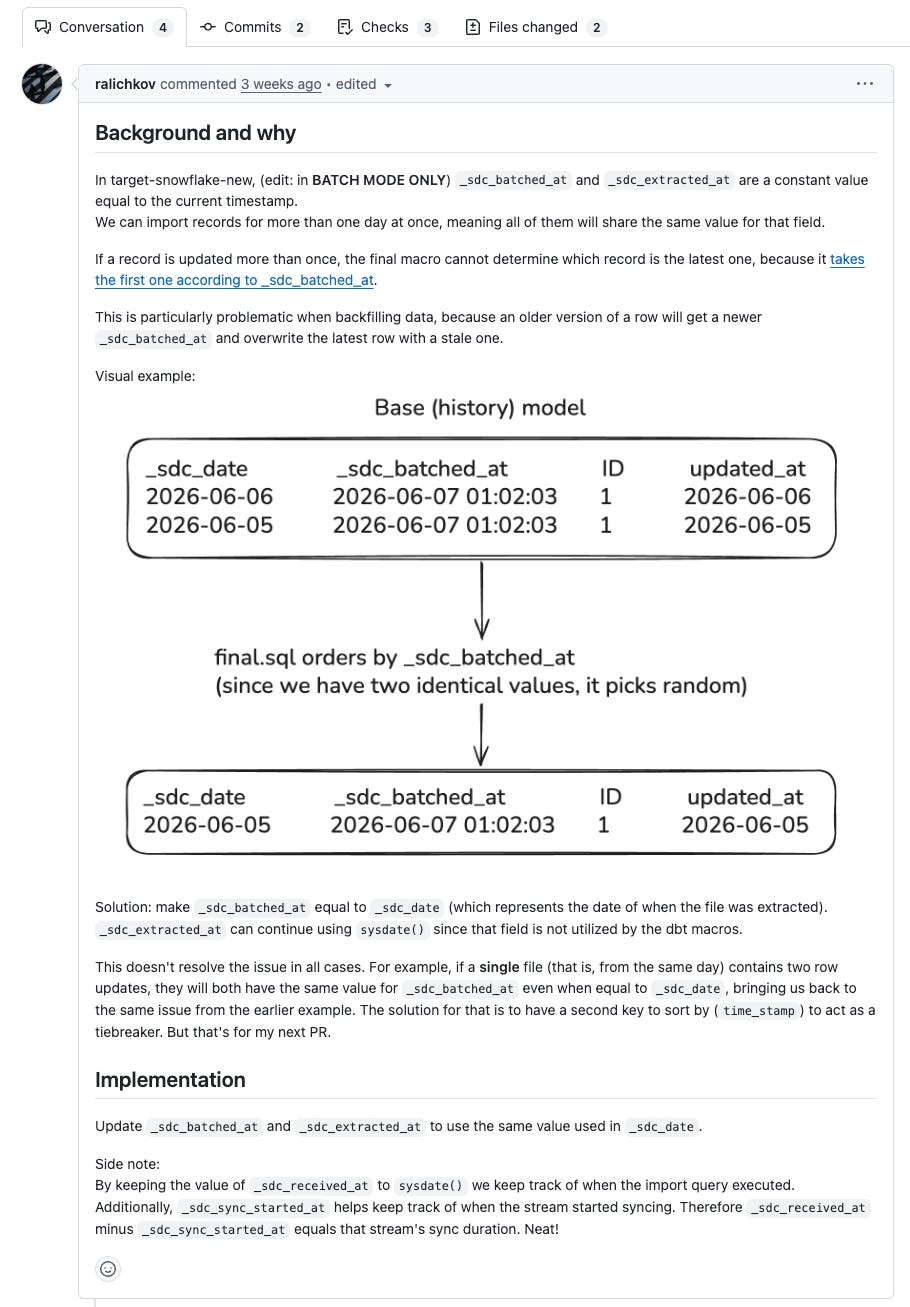
Just last week I ran a Show and Tell session for our DnA team (yes, that stands for Data and Analytics) last week to remind the team why use pull requests.
So let’ me ask you the same question I asked last week:
Why do we open pull requests?
Most people say “So others can spot issues we may have missed”, and while this is true, it’s only half of the story.
The other part is again knowledge sharing. A proper pull request serves as documentation when you write a clear description and commit messages that explain not just what you did, but why.
I could write an entire article on structuring a pull request that speeds up reviews and shipping. But what matters right now is to write more than three lines.
A good description needs at least three sections.
Background. What’s the current state? What problem are you solving?
Goal. What exactly are you trying to do, and how does your solution get you there?
Implementation. What did you do at a high level, and why did you make the decisions you made? Answer the questions your reviewers would otherwise have to ask you directly.
Remember to list specific files that you want to get reviews for, and related pull requests, tickets, and anything that would help your reviewers go through the review quickly.
A well structured pull request description helps your reviewers understand what you’re doing, learn from it, but also review your code properly instead of just approving it blindly.
My experience shows that spending a few minutes writing a proper description, you actually saves your reviewers time now and, yourself the headaches later.
For my team, pull requests are not something you open to follow a process and then you close. We treat them as long-term documentation. When you need to know why a change was made months later, you trace it to a specific commit, and that commit ties back to a pull request.
Document your commits well, document your pull requests well, and people will actually understand the decisions behind them.
Micromanagement
This one is a bit controversial, so let me say upfront: I hate micromanagement. Micromanagers the worst as they strip their team of any sense of autonomy.
But here’s the problem in a remote working environment. When somebody struggles with their code or their project, you can’t see it. In an office, you’d notice within a day. Remotely, all you have is their status update during the daily, and that’s not always enough to tell you what’s actually going on.
So when somebody misses a deadline twice, I start nudging them. Not the first time, not even the second. But by the third or fourth miss on the same project, I start checking in daily. In the morning, during the daily, I ask directly:
What’s your plan?
Is it realistic?
What’s actually blocking you?
If then need help, or I’m not clear what’s blocking them, we catch up right after the daily Sometimes this results pair coding, and some times I point them to the right person.
Later in the day, usually after lunch, I check in again.
I know this isn’t a great approach, and I don’t use it by default. I only reach for it when someone is genuinely struggling with their project.
This approach is easier in an office, where people ask their small questions a few times a day without thinking twice. Remotely, people hold back on asking for help. Someone once told me directly: “I don’t know how busy you are, so I’d rather not bother you”. So, reaching out first isn’t irritating, and it actually shows you’re there for them.
And you need that, because failing to deliver for a long stretch makes people feel guilty. It makes them feel like they’re failing. Knowing someone is there to help them hit their goals is great for their mentality.

Other Meetings
As technical people, you and I hate meetings. But the reality is that when working remotely, you do need meetings. Not all the time, and you should really avoid them when you can, yet some are unavoidable. Here are the meetings I run with my team.
One-to-One
First is the one-to-one. When you work remotely, you can’t skip this. Some people run these once a month or even once a quarter. That’s not enough. Weekly one-to-ones are a must.
I use them for whatever my team members want to talk about, whether that’s casual chat or something on their mind. Th one-to-one is also the time to talk about bigger projects, ideas, and non-urgent feedback in both directions.
Run these meetrings every single week with every single one of your team members. And here’s a pro tip: try to squeeze them all into a single day, maybe two if you have too many. I’ve dedicated Wednesdays and Thursdays to one-to-ones with my team, my manager, and a few other people I mentor across the organization.
If you want to learn how to run better one-to-one meetings, check this article I wrote earlier this year.

Retros
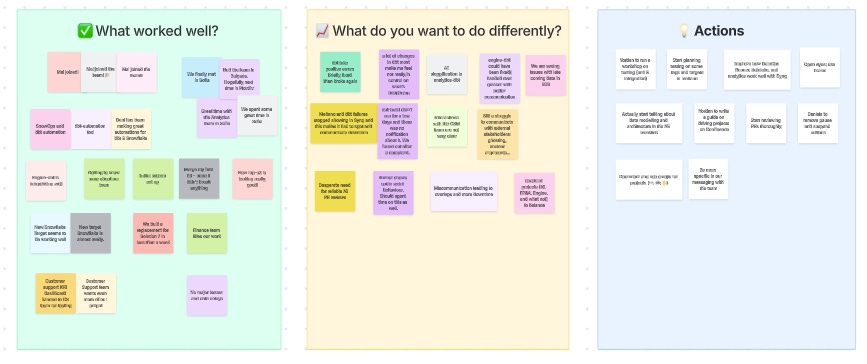
Every month, my team and I get on a call and go through the previous month. We talk about what went well, what we could improve, and what our action steps are.
This is a fully open discussion. My team members are free to tell me I’m an asshole, and I take it, because the point is to improve, not to defend the organization or my own decisions.
That matters even more remotely, because you don’t really have the option to pull someone aside privately and talk it out over lunch. Doing it together, as a team, works far better.
Brainstorming
We run plenty of brainstorming sessions, one-on-one, with a subgroup, or with the entire team. When somebody has a problem they need more time to explain, or wants opinions on what they’ve tried, we organize an ad-hoc session and hop on a call to work through it together.
Just today, someone from my team and I, spent half of the day in a call to run a complex migration.
This helps people understand areas they don’t normally touch, learn from eachother, and share their own experience.
It works well as a group session, but a single pair-programming session does the same job. Pair programming is one of the things my team consistently asks for.
Written Communication
As I said, meetings are great for bonding and for expressing thoughts quickly, but you should avoid them when written communication does the job. My rule of thumb is:
We work remotely, so async communication comes first. Use meetings only for recurring check-ins or when you genuinely need one. Everything else needs ink.
The thing is most people don’t know how to write. Managers are terrible at written communication themselves, and they never train their team on it either. Without that training, you usually get one of these:
WhatsApp message: sending one word per line, like a text thread.
Crystal ball: expecting people to somehow guess what you mean.
Silent hill: you never send updates, and getting one out of you feels like pulling teeth.
That’s why training my team on proper written communication is a top priority for me. And I hate to admit it, but I’ve let people go because they never learned remote working communication etiquette.
BLUF
I’ve written about BLUF before. In short, it’s a framework that allows you to write structured messages that give enough context, so people know exactly what problem you have, why you have it, and what you need from them.
BLUF allows people to read just a part of your message and still get everything they need.
Overcommunication
The harsh truth is that people are way too busy with their own shit, so you should not expect them to remember what you’ve told them 3 weeks ago.
Always share the full context with the receiving end, even if you believe they should already have it. Its your job to remind them where you left things last time and what you need from them now.
When you overcommunicate, you stop people from asking what this was about. Or worse, from pretending they remember and hoping to catch up later.
Last, sharing context often helps new readers get up to speed quickly, without scrolling through the entire chat history.
Scoping docs
These documents guarantee you actually do what you and the stakeholder agreed on. They also prevent the stakeholder from adding more and more changes to the initial requirements.
Write these regardless of whether you work remotely. For now, here’s what a good scoping doc needs:
Background
Objective
Stakeholder map
Deliverables
Risks
There’s more, to be said about that, and I strongly recommend reading my deep dive and getting my scoping doc template when you’re done with this article.

Postmortem reports
I’ve mentioned these many times before, and like scoping docs, I recommend using this tool even if you work on-site.
Postmortems are incident reports where you focus on the facts, lessons, and actions, so similar incidents don’t happen again.
The most important thing about postmortems is avoiding blame. In my experience, when an incident happens, it’s because your process allowed it to happen. Murphy’s Law is right in this case
Anything that can go wrong will go wrong.
Read this article to get my incident report guide and template

SOPs
Standard Operating Procedures are short documents where you explain exactly what you do in a given situation.
When you work remotely, you’re not always able to share your screen and walk your team through everything. That doesn’t scale. And you don’t want to be tethered to your laptop during every vacation.
So if you run a strict set of steps in a given situation, create a page on Confluence and make sure everybody knows about it. Good examples here are our pipeline debugging process and our pull request process.
AI makes writing SOPs a breeze, and I gave a complete demo how you can do it in just a few minutes. Watch the demo, and remember to copy the prompt.

Focus Time
And before we wrap it up: when working remotely, as an engineering lead, you are responsible with protecting your most precious resource, your time.
In the office, interruptions are easy. It takes someone a few seconds to walk up to your desk and break your focus. When working remotely, fighting context switching is far easier. But doing it well is more a mindset shift than anything else. So, I want you to learn this:
You are not obligated to respond on the spot.
A relationship where you’re expected to respond within seconds is toxic. You’re an adult, and you’re paid to exercise agency. Yes, sometimes that means choosing to answer your boss after you finish writing that deduplication query.
So, here’s what I want you to do.
Stop phone notifications
Seriously, these notifications are usless. You absolutely don’t need be bothered by every status update, new TikTok video, or “Someone viewed your profile” message.
The only thing that really needs to make a sound is phone calls, because that’s how people reach out in case of emergency. Everything else stays silent.
The way I think about is this:
My phone is my property. I control it, and I don’t want it to tell me it needs my attention.
Stop computer notifications
Do the same with your computer. Turn off notifications from email and Slack. You don’t need to know about a new pull request immediately, or that a vendor is trying to sell you something. I’ll cover how to handle that later. For now, turn the notifications off.
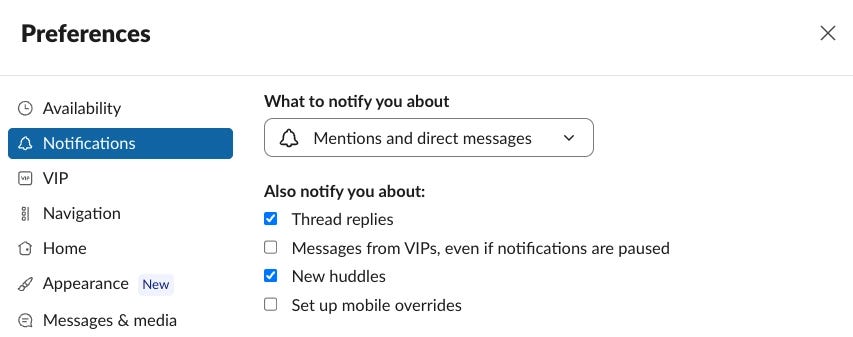
On Slack, I only allow notifications for direct messages and when someone tags me. Nothing else gets through, not even a message from my boss. I’ll deal with it when I have time. Context switching is a disease, and you want to avoid it at any cost.
Block time
Now about time management itself. The principle is simple:
A single hour-long block of focused work beats four 15-minute blocks.
As I already said, you need avoid context switching at any cost. That’s why I recommend blocking chunks of your time for specific needs.
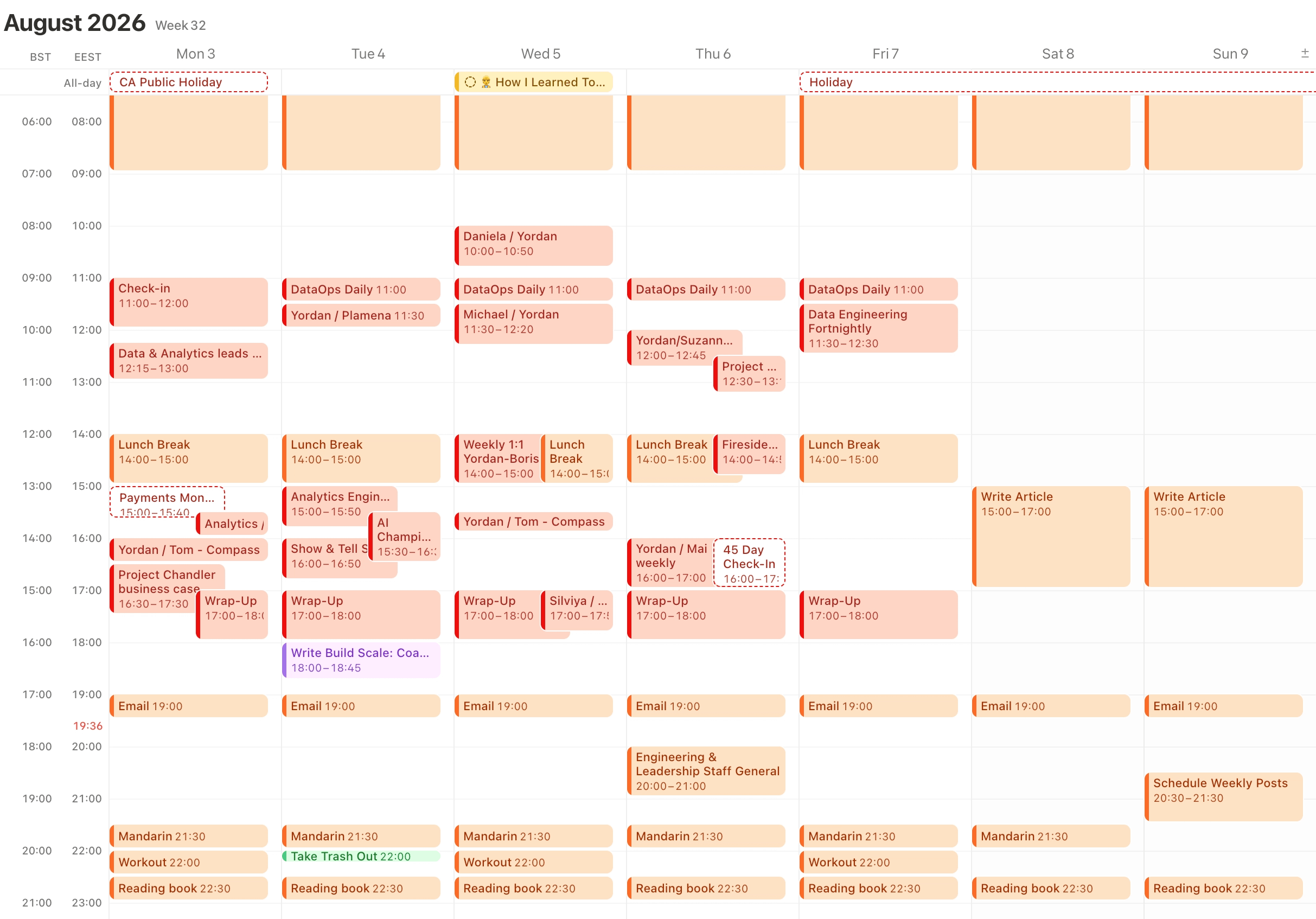
So, after grouping all your one-to-ones in a day or two (I already mentioned it earlier), I want you to block 3 more blocks:
Your lunch break, so you don’t forget to eat. That happens more often than you’d expect.
30 minutes just before your lunch break for pull request reviews.
One hour at the end of your day for another round of PR reviews and notes
Once done with these, keep adding small blocks for focused work when you can. And, check Slack and email for missed messages roughly once an hour.
Final Thoughts
Working remotely is genuinely hard. It takes real intention and self-control, and honestly, most people lack both. If you’re leading a remote engineering team and you learn to do this properly, you set yourself up to outperform most other leaders out there.
And if you learn to manage a remote team effectively, doing the same in an office would feel like child’s play.
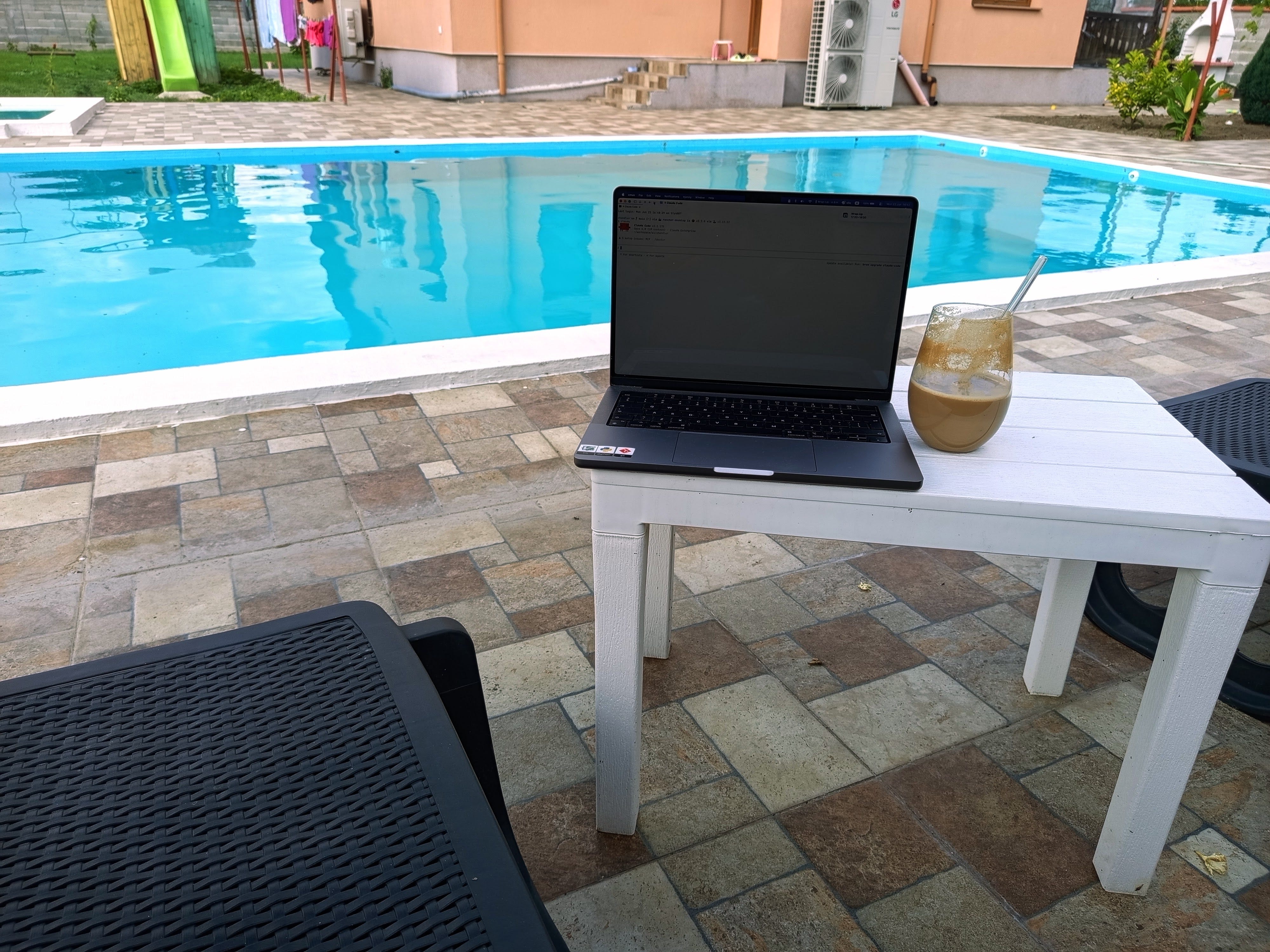
That said, after working from home for almost a decade now, I don’t think I’ll ever go back. Come on, no organized fun with pizza beats this.
—
Until next time,
Yordan
PS: Everything in this article is one click away for paid subscribers. If you lead a remote team and want the templates instead of building them from scratch, upgrade here.